
A customer portal often begins as a modest request: Customers should be able to log in, view documents and update their contact information. Three meetings later, the portal is expected to handle orders, authorisations, discrepancies, invoices and a reporting format that only one person in the finance department remembers the reason for. Scope has a way of multiplying when someone opens a spreadsheet.
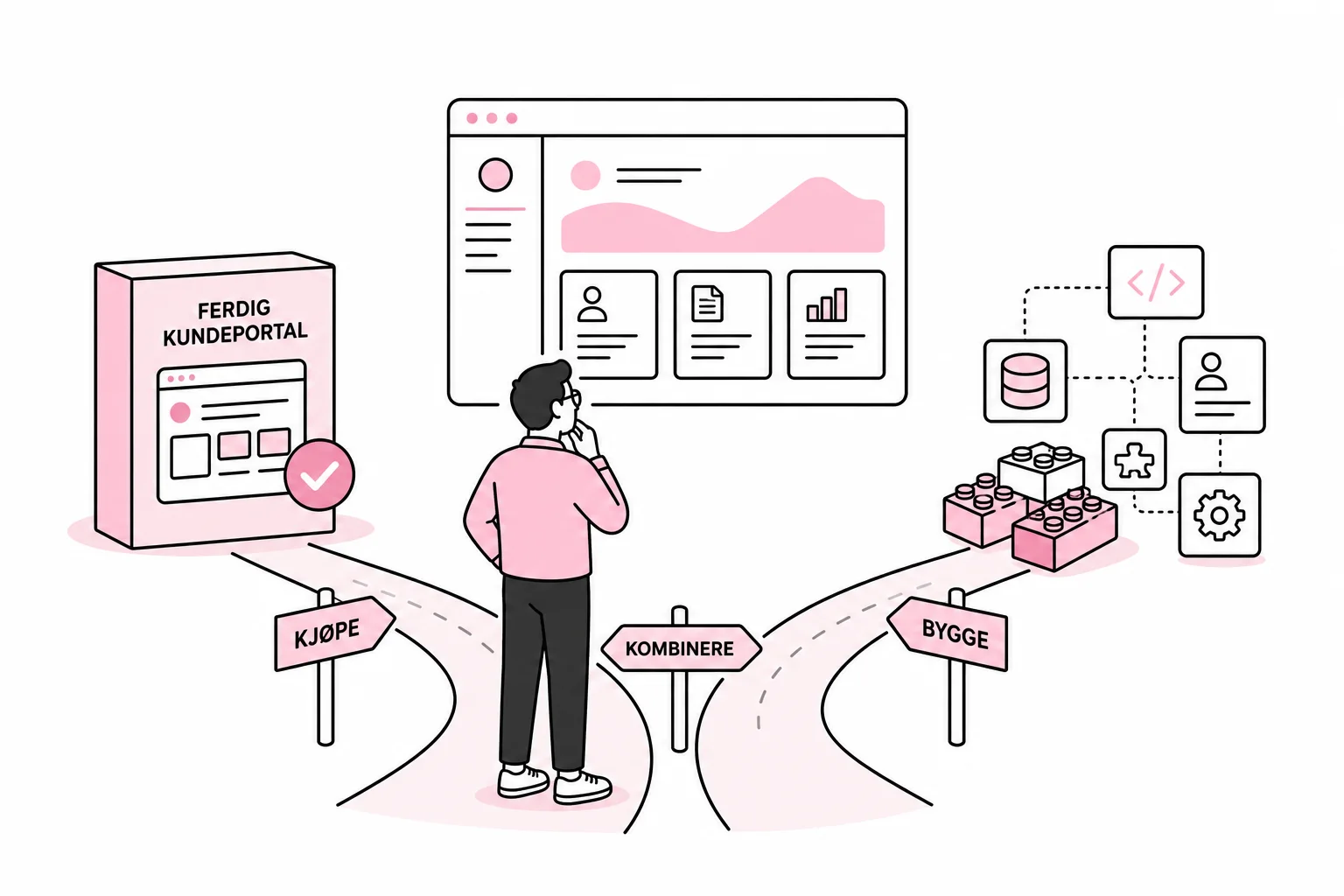
The question, therefore, is not simply whether you should build or buy. You need to determine which parts are standard requirements, which set your business apart from others, and how much technical responsibility you actually want to own. For many, a combination is the right choice: buy the core functionality, and build the integrations or workflows that are unique to your business.
Start with the task the portal should solve
Do not evaluate products or development technology until you can describe the portal’s most important tasks. A good requirements description is about what users should be able to do, not which buttons the solution should have. “The customer should be able to find all active agreements and download the associated documentation” is more useful than “we need a document module”.
Choose three to five prioritised user journeys. For example, a customer might create a case, track its status, approve a quote or manage which colleagues have access. Also describe what happens behind the scenes: Which system owns the data, who approves the change, and how quickly should the information be updated?
- Users: Who should be able to log in, and do they represent themselves or a business?
- Permissions: Are roles, authorisations or access to specific customers, projects and documents required?
- Data: Which systems are the source of customer, order, agreement and invoice information?
- Actions: Should users only be able to view information, or also place orders, approve and make changes?
- Requirements: What are the requirements for accessibility, privacy, logging, security and deletion?
Then distinguish between requirements that must be met at launch and wishes that can wait. Without this prioritisation, the requirements list quickly becomes a wishing well with a login. The result is often that both standard products and custom development appear inadequate, because they are compared with a portal that exists only as optimistic bullet points.
When it makes sense to buy
A standard solution is often the right choice when your needs resemble those of many other businesses. Login, document sharing, forms, messages, basic case status and user administration are functions that rarely need to be strategically developed from scratch.
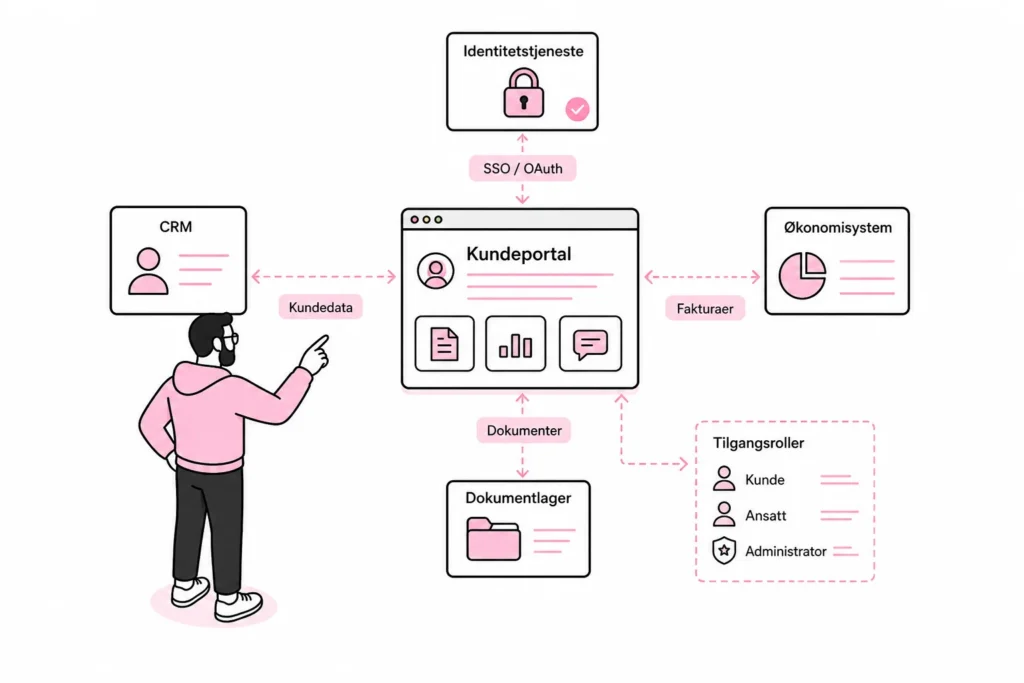
The advantage is a shorter path to launch and less responsibility for basic product development. The supplier usually maintains the platform, fixes bugs and further develops the standard features. You still need to clarify who is responsible for configuration, integrations, access control and incidents. “Operations included” does not automatically mean that someone will detect an error in your integration before your customers do.
Pay particular attention to how the solution handles identity and permissions. A customer portal for the business market often needs to support one user representing multiple businesses, and an administrator at the customer’s organisation inviting or removing colleagues. Simple role-based access may be sufficient, but some businesses need rules based on agreements, locations or projects.
Also be cautious with solutions that cover missing core functionality through a large number of add-ons. A marketplace with extensions can resemble a tapas menu: Each individual dish seems reasonably priced, but the table ends up full of bowls that do not quite fit together. Each add-on also brings its own costs, updates, dependencies and potential security issues.
Before you buy, the supplier should demonstrate your most important user journeys using realistic data and roles. A general product demonstration primarily shows that the presenter knows the product. A focused trial shows whether the product understands your needs.
When it makes sense to build
Custom development may be the right choice when the portal supports workflows that give you a genuine competitive advantage, or when standard products require so many workarounds that the customisation becomes the project itself. This also applies when the portal must bring together complex rules and data from several specialist systems in one precise workflow.
Building does not necessarily mean programming everything from scratch. Login can be provided by an identity service, payment by a payment provider and document storage by a suitable cloud service. Development should focus on the part that is unique to the business. Writing your own login mechanism is rarely innovation; it is more like casting your own hinges before building the door.
Custom development gives you control over the user experience, data model and functionality, but control comes with responsibility. You need a setup for operations, monitoring, security updates, backups, testing and further development. In addition, someone must understand the solution when the original developers are no longer available.
Be sceptical of “magic” platforms that promise complete flexibility without development. Such tools can be useful for narrowly defined workflows, but complex access rules and integrations do not disappear simply because they are drawn as colourful boxes. Sometimes you just get programming with larger boxes and less space on the screen.
Consider a hybrid
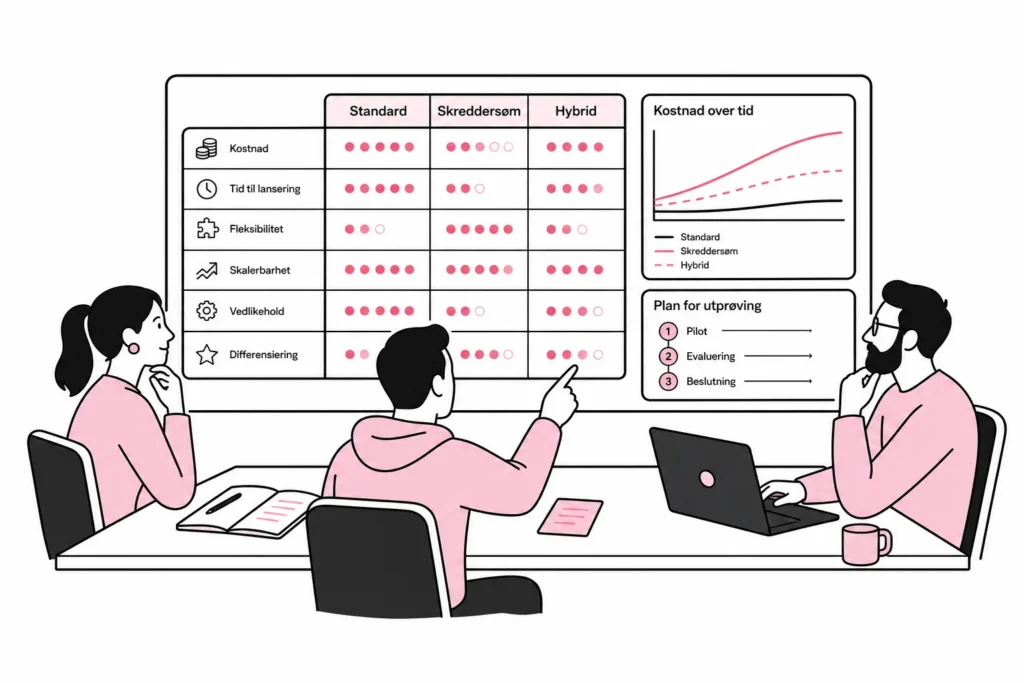
For many businesses, the hybrid model is the most realistic. You can buy a mature platform for login, user administration and content, while building your own interface or services for business-critical processes. Another option is to use a standard product as the portal, but retrieve data from your own systems through controlled APIs.
A hybrid approach provides flexibility, but the boundaries must be clear. Clarify which system owns each data type, where the business rules reside, and what happens if an integration is unavailable. If the same customer status can be changed in three systems, you do not have flexibility. You have three possible explanations for why the number is wrong.
Compare total cost and risk
Do not compare only the licence price with the estimated development cost. Calculate a realistic total cost over several years. For a purchased solution, this includes licences, implementation, configuration, integrations, add-ons, training and supplier assistance. For a built solution, you must include analysis, design, development, testing, operations, security, bug fixing and ongoing improvements.
Also consider the cost of change. How much work is required if you replace your accounting system, introduce a new pricing model or need to change the permission structure? An inexpensive solution can become costly if every change requires specialist assistance. The term “future-proof” should be treated with caution; often it simply means that the invoices are highly likely to continue into the future.
Supplier dependency must be examined before the agreement is signed. Ask for specific answers about how data can be exported, which formats are used, who owns the configuration and custom development, and what happens when the relationship ends. Also check whether the integrations use documented interfaces or depend on manual exports and fragile workarounds.
- Give each alternative a score for coverage of the most important user journeys.
- Assess integrations, data quality and access control separately.
- Calculate costs for both implementation and ongoing management.
- Describe the biggest technical and organisational risks.
- Test at least one critical user journey before making the final decision.
Make the decision based on documented needs, not the number of features in a sales presentation. Choose a standard solution when the need is largely standardised, custom development when the workflow is strategic and unique, and a hybrid when you need both. The best customer portal is not the one with the most modules. It is the one that lets customers complete their task while you can still operate it after the project team has stopped using the term “portal journey”.