
← Our pluginsFree WordPress tools from SolidWeb
SolidWeb plugin / v1.4.0
Solid.Subscription – Subscription system for WordPress with Vipps, Stripe and Klarna
Selling subscriptions in WordPress has traditionally meant building a complete online store with WooCommerce, adding WooCommerce Subscriptions, and then installing separate payment extensions for…
Selling subscriptions in WordPress has traditionally meant building a complete online store with WooCommerce, adding WooCommerce Subscriptions, and then installing separate payment extensions for each payment provider.
For many businesses, this is far more than they actually need.
Solid.Subscription is designed as an alternative: a complete subscription system directly in WordPress, created specifically for recurring payments and membership-based services – without requiring WooCommerce.
With Solid.Subscription, you can create subscriptions, accept automatic payments, manage subscribers, protect content, track revenue, handle refunds, and migrate existing Vipps subscriptions from WooCommerce Subscriptions.
From version 1.4, the plugin supports three payment solutions:
Vipps MobilePay Recurring, Stripe and Klarna.
Everything is managed from a single WordPress dashboard.
One subscription system – multiple payment methods
Solid.Subscription is built with a shared subscription engine where the payment provider can be selected separately.
A subscription type can be made available with:
- Vipps
- Stripe
- Klarna
- or multiple payment methods at the same time
If multiple payment methods are available, the customer can choose how to pay for the subscription when the agreement is created.
The subscription itself is still managed by Solid.Subscription.
This means that access control, reports, membership status, cancellation and subscription history all work the same way regardless of the payment method.
Vipps MobilePay Recurring
The Vipps integration makes it possible to create genuine recurring Vipps subscriptions directly from WordPress.
The customer approves the subscription in Vipps the first time. Future payments can then be handled automatically.
Solid.Subscription handles, among other things:
- creating Vipps Recurring agreements
- initial payment
- automatic future payments
- upcoming recurring charges
- the status of the Vipps agreement
- payment status
- cancellation
- refunds
- webhook events
- synchronization between Vipps and WordPress
This makes it possible to offer, for example:
499 kr per month with Vipps
without WooCommerce or WooCommerce Subscriptions.
Stripe Subscriptions
Solid.Subscription also offers direct support for Stripe.
The Stripe integration uses Stripe Checkout when the subscription is started and Stripe Subscriptions to manage recurring payments.
This makes Solid.Subscription particularly interesting for businesses that also have international customers.
The Stripe integration handles, among other things:
- creating a Stripe customer
- Stripe Checkout
- subscriptions with Stripe
- automatic invoicing
- successful payments
- failed payments
- changes to the subscription status
- cancellation
- refunds
- signed Stripe webhooks
The payment status is synchronized back to Solid.Subscription so that the user's access can be managed automatically.
Klarna subscriptions
Solid.Subscription also supports recurring payments with Klarna.
When the first order is placed, the customer authorizes Klarna and a tokenized payment agreement is created.
Solid.Subscription can then use the existing agreement to create future subscription payments.
This makes it possible to offer Klarna as a payment option for services that are paid for regularly.
The plugin supports:
- subscriptions with payment at sign-up
- subscriptions with a free trial period before the first payment
- future merchant-initiated recurring payments
- handling failed Klarna payments
Ongoing subscriptions
The default type in Solid.Subscription is a standard ongoing subscription.
Example:
NOK 299 / month
The subscription then continues automatically without a predetermined end date.
Payments continue until:
- the customer cancels
- an administrator terminates the subscription
- the payment provider terminates the agreement
- or the subscription must be stopped after repeated payment failures
This is the most common model for memberships, support agreements and digital services, for example.
Fixed number of payments
Not all subscriptions should last forever.
A subscription type can therefore also be limited to a specific number of payments.
Example:
NOK 1,490 per month for 6 months
Solid.Subscription automatically keeps track of how many payments have been completed.
Once the final payment is complete, no further charges are created.
This can be used for:
- courses
- payment plans
- project agreements
- time-limited memberships
- service packages
- instalment payments for digital services
Subscription with an end date
A subscription can also have a specific end date.
Example:
A membership should be active until 31 December.
Solid.Subscription then stops creating new renewals when the end date is reached.
If the customer has already paid for a period extending to the end date, access is retained for the paid period.
Flexible billing intervals
Solid.Subscription supports multiple intervals:
- day
- week
- month
- year
You can also specify the number of intervals between each payment.
This means you can create, among other things:
- every week
- every 2 weeks
- every month
- every 2 months
- every quarter
- every 6 months
- every year
The subscription engine automatically calculates the next payment date.
Free trial period
A subscription type can have a free trial period.
For example, you can offer:
14 days free – then NOK 299 per month.
The user can receive access immediately, while the payment agreement is already created.
When the trial period expires, the regular subscription cycle begins.
Unlimited number of subscription types
The administrator can create as many plans as the website needs.
Each subscription type can include:
- name
- description
- price
- currency
- billing interval
- number of intervals
- trial period
- grace period
- subscription length
- maximum number of payments
- end date
- WordPress role
- benefits
- button text
- payment methods
- active or disabled status
This allows a single installation to handle very different services.
WordPress roles based on subscriptions
Solid.Subscription can automatically assign a specific WordPress role to a user when the subscription becomes active.
Example:
A customer purchases a membership and is automatically assigned the role:
Premium member
This role can be used to control which areas of the website the user can access.
When the subscription is cancelled or expires, access can be automatically removed again.
Protect pages and content
The plugin can be used as a simple membership platform.
You can protect:
- WordPress pages
- blog posts
- custom post types
- parts of content
This means Solid.Subscription can be used for much more than just payments.
For example, you can create:
- member pages
- customer portals
- premium articles
- document archives
- paid guides
- course content
- internal resources
Shortcodes
Solid.Subscription includes shortcodes that allow you to place the subscription solution directly into an existing WordPress design.
You can display, among other things:
- subscription types
- subscription buttons
- the customer's subscription
- member content
This means the plugin is not dependent on a specific WordPress theme.
My subscription
Customers get a dedicated page for their subscription.
Here, customers can see, among other things:
- subscription type
- payment method
- price
- billing interval
- status
- next payment
- start date
- payment history
Depending on the configuration, customers may also cancel their subscription themselves.
Cancellation at the end of the period
If the customer cancels the subscription, access does not necessarily have to disappear on the same day.
Solid.Subscription can allow the customer to use the service until the end of the period that has already been paid for.
Example:
A customer who pays monthly cancels on September 12, but has paid through September 30.
Access is therefore retained until the end of the period.
The subscription is then cancelled.
Handling payment failures
A failed charge should not necessarily terminate the customer immediately.
Solid.Subscription supports a grace period.
This means that a subscription can enter a temporary payment failure status while the customer still has access.
This provides time for:
- a new payment attempt
- an update with the payment provider
- manual follow-up
- contact with the customer
If the payment is not resolved within the specified period, the subscription can be cancelled.
Payment history
All payments are recorded in Solid.Subscription.
The administrator can view, among other things:
- the customer
- the subscription
- plan
- payment provider
- amount
- currency
- status
- external payment reference
- timestamp
- any errors
This gives the website a consolidated payment history even when different customers use different payment providers.
Refunds
The administrator can refund payments directly from Solid.Subscription where the gateway supports it.
This may include:
- full refund
- partial refund
The refund is also recorded in Solid.Subscription so that reporting shows actual net revenue.
Event log
The plugin has its own event log.
Here, the administrator can review technical events such as:
- subscription creation
- payment status
- webhook events
- gateway errors
- cancellations
- renewals
- migration events
This is particularly useful for troubleshooting.
Automatic webhooks
Vipps, Stripe and Klarna communicate with Solid.Subscription through the gateway integrations.
Webhooks are used, among other things, to notify the website when:
- a payment succeeds
- a payment fails
- a subscription changes status
- an agreement is terminated
- a payment is refunded
Solid.Subscription then updates its local subscription status.
WP-Cron as an additional safeguard
For certain processes, Solid.Subscription also uses WordPress Cron.
This serves as an additional security mechanism if a webhook is not received or an upcoming payment needs to be checked.
Complete reporting system
Solid.Subscription includes a dedicated reporting area.
Here, administrators can view the most important subscription metrics without using an external analytics tool.
The reports include:
- net revenue
- gross revenue
- refunds
- new subscriptions
- active subscriptions
- cancellations
- successful payments
- failed payments
MRR – Monthly Recurring Revenue
For subscription businesses, MRR is one of the most important key metrics.
Solid.Subscription automatically calculates monthly recurring revenue based on active subscriptions.
Annual and other payment intervals are normalized to a monthly value.
This provides a much better picture of the subscription company's ongoing revenue than the actual payments made during the month alone.
ARR – Annual Recurring Revenue
The plugin also calculates ARR.
ARR shows the annualized recurring revenue from subscriptions.
Example:
If MRR is NOK 100,000, ARR will normally be around:
NOK 1,200,000.
Payment rate
The dashboard also shows the share of payments completed without errors.
This makes it easier to detect if a payment provider suddenly experiences more failed charges than usual.
Reports by payment provider
From v1.4, Solid.Subscription can separate reports by:
- Vipps
- Stripe
- Klarna
This makes it possible to see which payment method customers actually use.
You can view revenue and payments by gateway, among other things.
Reports by subscription type
You can also view results by plan.
This allows you to identify:
- most popular subscriptions
- subscriptions with the highest revenue
- highest MRR
- number of active customers per plan
Period filter
Reports can be filtered by, among other things:
- last 7 days
- last 30 days
- this month
- last month
- current year
- custom period
CSV export
Payment data can be exported to CSV.
The export can include, among other things:
- customer
- date
- amount
- currency
- gateway
- status
- transaction reference
The CSV file can be used in Excel or accounting systems, for example.
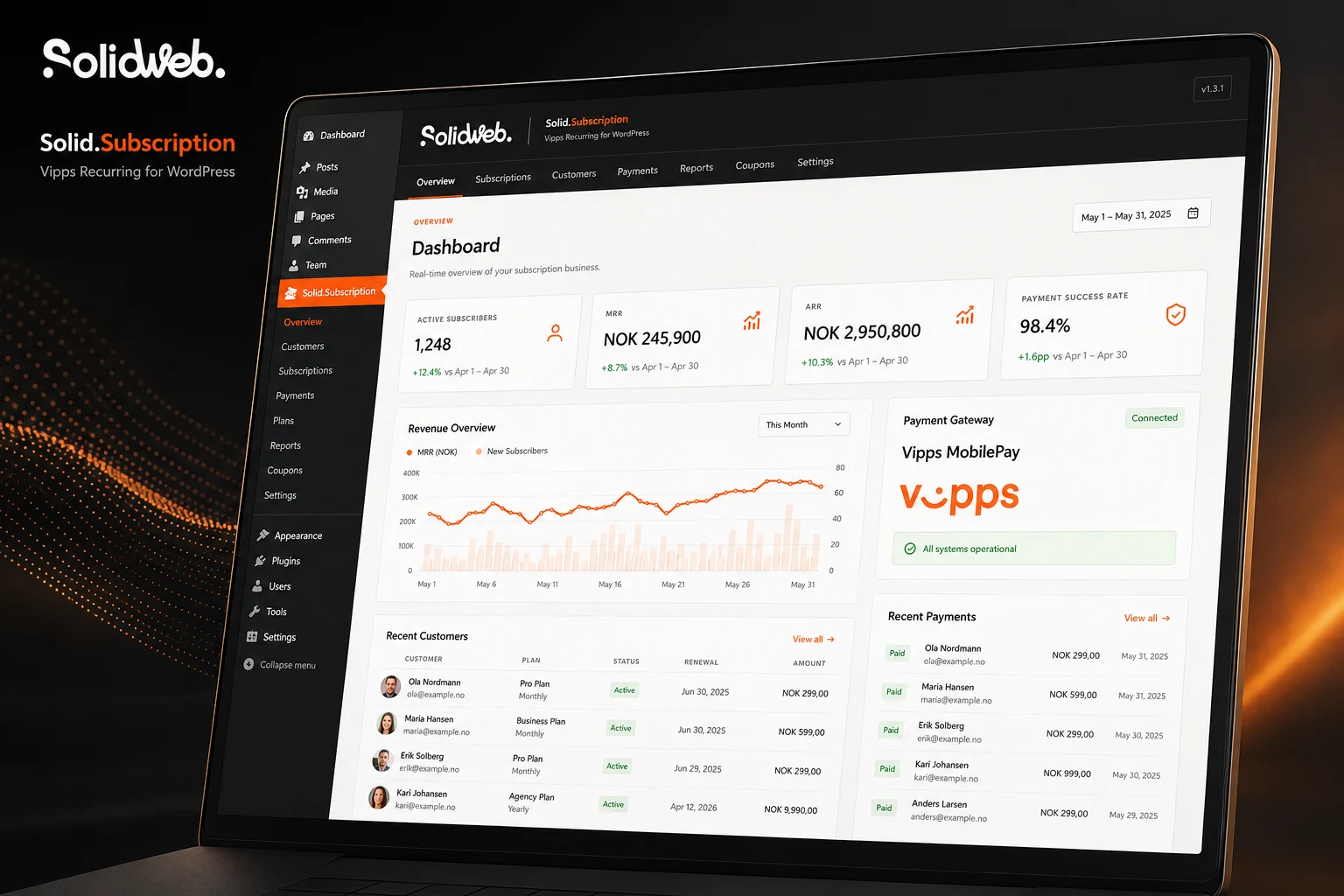
Clear dashboard
Solid.Subscription has a modern administration panel directly in WordPress.
The front page provides a quick overview of, among other things:
- active subscriptions
- MRR
- ARR
- payment rate
- revenue
- recent payments
- latest subscribers
- gateway status
The plugin has dedicated sections for:
Overview
Subscription types
Subscriptions
Payments
Reports
Migration
Events
Settings
SolidWeb design
The admin interface is developed with a distinct SolidWeb design and clearly sets itself apart from standard WordPress settings pages.
All pages have a unified black top header with the SolidWeb logo and access to the plugin’s key areas.
The goal is for Solid.Subscription to feel like a complete system within WordPress, not just a small settings plugin.
Migration from WooCommerce Subscriptions
One of Solid.Subscription’s more distinctive features is the ability to migrate existing subscriptions from:
WooCommerce Subscriptions + Vipps Recurring
For businesses that already have many active Vipps subscribers, this can make the transition to a simpler solution significantly easier.
Scan existing WooCommerce subscriptions
The migration system searches for active WooCommerce Subscriptions using Vipps Recurring.
It attempts to retrieve, among other things:
- WooCommerce subscription ID
- customer
- product
- price
- currency
- billing interval
- next payment
- Vipps Agreement ID
Verification with Vipps
The agreement can then be checked directly with Vipps.
Solid.Subscription compares the data from WooCommerce with the information in the existing Vipps agreement.
If, for example, the price or interval does not match, the subscription is flagged before migration.
Dry run
Migration never starts by immediately modifying all subscriptions.
The first step is a preview.
The administrator can review:
- which subscriptions are found
- which plans are created
- which agreement IDs are used
- price
- interval
- next payment
- any issues
Automatic creation of subscription types
WooCommerce products can be converted into Solid.Subscription plans.
Example:
WooCommerce:
Service agreement – NOK 599 per month
can automatically become:
Solid.Subscription:
Service agreement – 599 NOK / month
Retains the existing Vipps Agreement ID
Where possible, the existing Vipps agreement is retained.
This means the customer may not need to create an entirely new subscription and approve Vipps again.
This is an important part of the migration system.
Import without starting billing
During the first migration phase, customers and subscriptions are imported into Solid.Subscription, but the new billing is paused.
WooCommerce therefore continues to handle existing payments.
This allows the administrator to verify that everything looks correct before the final handover.
Take over billing
Once everything has been checked, the administrator can complete the final step.
Solid.Subscription can then:
- recheck the Vipps agreement
- disconnect WooCommerce from future Vipps renewals
- retain the history in WooCommerce
- update the subscription in Solid.Subscription
- take over future billing
Explicit administrator confirmation is required before this happens.
Protection against double charges
During a subscription migration, double charging is one of the greatest risks.
Solid.Subscription therefore does not start its own renewal process until the old WooCommerce billing has been disconnected.
Existing upcoming Vipps charges can also be adopted where the migration system finds them.
Rollback
If a critical step during the takeover fails, Solid.Subscription attempts to restore the previous WooCommerce configuration.
This may include:
- payment method
- Agreement ID
- renewal-status
- next payment date
The migration feature is therefore deliberately built as a multi-step process rather than a simple “Import all” button.
Test and production environments
Payment integrations should always be tested before being activated with real money.
Solid.Subscription therefore has separate settings for the different gateways.
Here, the administrator can configure the necessary API keys and use the providers’ test environments where available.
Connection and status checks have also been added for the payment integrations.
No WooCommerce required
Solid.Subscription is designed specifically for businesses that want subscriptions, but not necessarily a full online store.
After installation, the entire subscription solution can work without:
- WooCommerce
- WooCommerce Subscriptions
- WooCommerce payment gateways
- WooCommerce order processing
This can provide:
- fewer plugins
- fewer dependencies
- simpler administration
- less complexity
- less technical overhead
WooCommerce only needs to be installed if you use the migration tool for an existing WooCommerce solution.
What can Solid.Subscription be used for?
The plugin can be used for many different types of services.
For example:
- memberships
- maintenance agreements
- support agreements
- web hosting
- maintenance agreements
- SaaS
- digital services
- premium content
- news subscriptions
- courses
- customer portals
- service agreements
- consulting agreements
- monthly service packages
- annual agreements
- time-limited subscriptions
- payment plans
One system for the entire subscription
The most important difference with Solid.Subscription is that the payment provider is only one part of the subscription.
The subscription itself is managed by Solid.Subscription.
This means the same system can handle:
the Vipps customer
the Stripe customer
the Klarna customer
in the same way after the subscription has started.
You get one central place for:
- customers
- subscriptions
- payments
- reports
- access
- cancellations
- history
Solid.Subscription
Solid.Subscription is developed for businesses that want a complete subscription solution directly in WordPress – without first having to turn the WordPress website into a full WooCommerce store.
With support for Vipps MobilePay Recurring, Stripe and Klarna, flexible subscription types, automatic payments, membership features, reporting and WooCommerce migration, the plugin can be used on both new websites and existing subscription platforms.
WordPress. Subscriptions. Vipps. Stripe. Klarna.
Without WooCommerce.
Developed by SolidWeb AS
solidweb.no


SolidWeb / Free tools